
Your iron farm stops the moment you walk away? Then you need a chunk loader – a setup that keeps certain chunks loaded permanently so your farms keep running even when no player is nearby. This guide explains the mechanic, shows the classic Nether portal chunk loader and the reliable alternatives for servers.
What is a chunk loader?
A chunk loader keeps one or more chunks "active" without a player being there. Only in loaded chunks do redstone, mob spawns, growth and item transport run. Without a chunk loader, everything outside your range "freezes".
How do chunks work?
- Chunk size: A chunk is a 16×16 block column across the full world height.
- Simulation distance: Sets how far around a player chunks are actively ticked (redstone, mobs, growth). Defined in
server.properties. - Render distance: How far a player sees the world – purely client-side, nothing ticks.
- Spawn chunks: In Java, the area around world spawn always stays loaded (a field of ~19×19 chunks, with a smaller core fully active). Farms here run permanently.
Why do you need a chunk loader?
So these builds keep running while you're elsewhere:
- Iron farm – produces iron around the clock
- Villager / trading halls – restock and profession ticks
- Redstone contraptions – clocks, machines, elevators
- Item sorters – hoppers keep moving items
- Crop farms – plants keep growing
- Mob farms – spawns keep running
Does a chunk loader work in every version?
The mechanic differs a lot – here's the overview:
| Platform | Chunk loading |
|---|---|
| Java Edition | Spawn chunks + the /forceload command; portal loaders work technically but are version-dependent |
| Bedrock | No /forceload; redstone loaders behave differently and are less reliable |
| Paper / Spigot | /forceload available; plus plugins and fine chunk settings |
| Fabric / Forge | Vanilla methods plus mods (e.g. dedicated chunk-loader mods) |
/forceload command is almost always the better choice than a redstone build: reliable, version-safe and without running entities. The Nether portal build below is the "vanilla survival" variant without commands.Build a chunk loader with a Nether portal
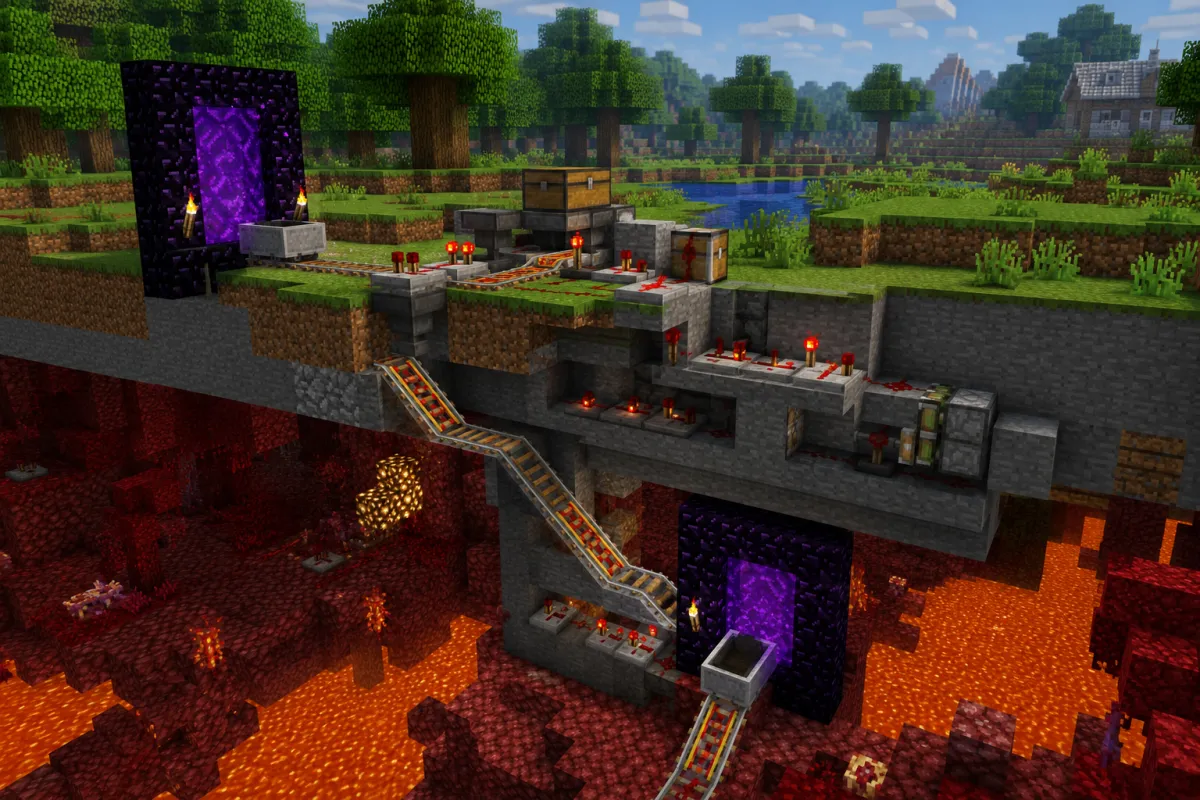
The principle: when an entity (e.g. a thrown item) travels through a Nether portal, the destination chunk on the other side is briefly loaded. Send entities through continuously and the chunk stays active.
Materials
- 1× Nether portal in the overworld + its linked portal in the Nether (min. 10 obsidian + flint and steel)
- 1× dispenser
- 1× hopper
- Redstone: 1 observer or a simple redstone clock
- An item supply (e.g. a stack of arrows/eggs to throw through)
Step by step
- Build the portal and walk through once so the counterpart in the Nether is created and linked.
- Place a dispenser right in front of the portal, facing it.
- Feed the dispenser via a hopper (supply loop).
- Trigger the dispenser on a beat with an observer/redstone clock – it keeps firing items into the portal.
- The items teleport through the portal and keep the destination chunk loaded.
Explaining the mechanic
When an entity enters a portal, the destination area of the other dimension is loaded so the entity can arrive. The chunk loader exploits this brief loading: the constant stream of entities means the chunk never fully unloads. Once the supply stops, the chunk "thaws" after a short time – and the farm halts.
Limits
- Usually keeps only a few chunks around the portal loaded – large builds need multiple loaders
- The running entities (the items) create minimal load themselves
- Version-dependent and not officially "intended" – can break with updates
- Much less reliable in Bedrock
Alternatives (recommended on servers)
| Method | When it makes sense |
|---|---|
/forceload add <from> <to> | Vanilla Java command since 1.13 – loads chunks permanently, no redstone. Best choice on your own server |
| Use spawn chunks | Simply build the farm at world spawn – it's always loaded |
| Chunk-loader plugin (Paper/Spigot) | Bind a loader to a player/claim, with limits against load |
| Chunk-loader mod (Fabric/Forge) | Dedicated blocks for loading, often with a time/cost limit |
# Example: load an area permanently (adjust coordinates)
/forceload add 100 -200 180 -120
/forceload query      # shows loaded areas
/forceload remove 100 -200 180 -120
Common mistakes
- Simulation distance too low – even loaded chunks won't tick if the value is too small
- Portal not linked – walk through once manually so the counterpart exists
- Supply empty – without items the loop stops and the loader fails
- Wrong dimension loaded – overworld and Nether side mixed up
- Forgetting
/forceloadon the server, even though it's the simplest solution
FAQ
Does a chunk loader stress the server? Yes, a little – every loaded chunk costs performance, running entities add more. Use sparingly on shared servers. How to measure and reduce load is covered in Optimize your Paper server.
How many chunk loaders are okay? As few as possible. Bundle farms close together instead of building many separate loaders.
Does it work without commands? Yes – the Nether portal loader needs no commands. With server access, /forceload is simpler and more stable, though.
Conclusion
For pure survival play, the Nether portal chunk loader is a clever redstone solution. On your own server, /forceload (or a plugin) is usually the better, more reliable choice. What always matters: set simulation distance correctly and keep an eye on server load.
Where to next
- Server sluggish from too many farms? Optimize your Paper server
- Build trading halls properly: All villager professions in Minecraft
- No server of your own yet? How to create a Minecraft server